
myDMV Help
myDMV Help
For the first time, you can create a personal myDMV account.
Manage your vehicles, track your credentials, and go paperless—all in one place.
This page has resources to help you successfully navigate the online portal.
Click here to go to the myDMV homepage.
Go Paperless
Opt-in for electronic renewal alerts. No more waiting on the mail.
Your Dashboard
View all your vehicles and your ID or driver license status in one secure view.
Skip the Line
You’re always first in line with myDMV, the gateway to DMV online services!
How to Get Started
Account creation is now open
Getting Started is Easy
To register, you will need:
- Your Colorado-issued driver license, permit, or identification card.
- Your Social Security Number (SSN) or Taxpayer ID (ITIN).
- Your date of birth.
- A valid email address.
Note: You may also use the document number from a form you used during your last DMV visit to help verify your account.
Create an Account
Link Your Vehicle
- Verify Your Identity - Enter your Colorado driver license, permit, or ID number along with the date of last issuance, the last 6 digits of your SSN/ITIN, and your date of birth to prove who you are.
- Create Your Profile - Once your ID is confirmed, enter your name and email address. Your email address will serve as your username.
- Confirm Your Email and Phone - Check your email for a verification code and enter it on the site. Once your email is confirmed, enter your phone number and choose your password.
- Secure and Finish - Choose your security questions (these help you get back into your account if you forget your password). Click "Submit" to finish creating your new myDMV account.
General FAQs
No, customers must have a valid CO DL/permit/ID to create a customer portal account.
Yes, you can still renew your vehicle online without creating a customer portal account.
You can complete many common DMV tasks as a guest without creating a myDMV account. These include:
- Renewals & Replacements: Renew your driver’s license, ID, or vehicle registration; request a duplicate title or registration card; and replace vehicle tabs.
- Payments & Reinstatements: Pay citations or reinstatement fees and upload required reinstatement documents.
- Appointments & Hearings: Schedule or reschedule appointments and hearings, or submit subpoena requests.
- Applications: Pre-register for a first-time license/ID, apply for disability placards, and submit emissions waivers or extensions.
- Status & Records: Check the mailing status of your ID, check title status, estimate registration fees, and request vehicle/title history searches.
- Vehicle Sales: Report a Release of Liability for a vehicle you have sold.
- Commercial Services: Create an IRP account, update Commercial Carrier IDs, and update emergency contacts.
Note: For security purposes, some tasks—such as changing your address, requesting a driving record, or replacing license plates—require you to log in to the secure customer portal.
Customer Portal FAQs
The customer portal gives you direct access to your Colorado driver license or ID (CO DL/ID) and any vehicles you’re listed as an owner of. If you’re not an owner but need to handle transactions on behalf of a family member, you can still do those outside the portal, just like you do today.
Yes, all registered owners of a vehicle can link that vehicle to their individual customer portal accounts.
No, vehicles are linked to a customer’s online portal account based on who the legal owners are in the DRIVES system.
When you title your vehicle, it will be automatically linked to your customer portal account right away if you provide your CO DL/ID during the transaction. If your vehicle doesn't appear in your portal, or if you didn't provide your CO DLN/ID when you titled the vehicle, you can submit a "Link my Vehicle" request. Just make sure the first and last name on your CO DLN/ID exactly matches the owner's name listed on your vehicle's title. View the step by step video below:
Yes, if your vehicle is registered in Colorado, you can still renew it online with an out-of-state DL/ID. This transaction happens outside of the customer portal.
No, the online customer portal on myDMV is separate from the myColorado app.
If you prefer not to enter your Social Security Number (SSN), you have two options for identity verification:
Enter a proof document number from your most recent credential issuance transaction.
OR
- Have an identity verification code sent to you via physical mail. Once you receive the code in the mail, you will use it to create your account.
After creating an account, you may have a red circle with a number next to the Action Center.

Click on the action center.
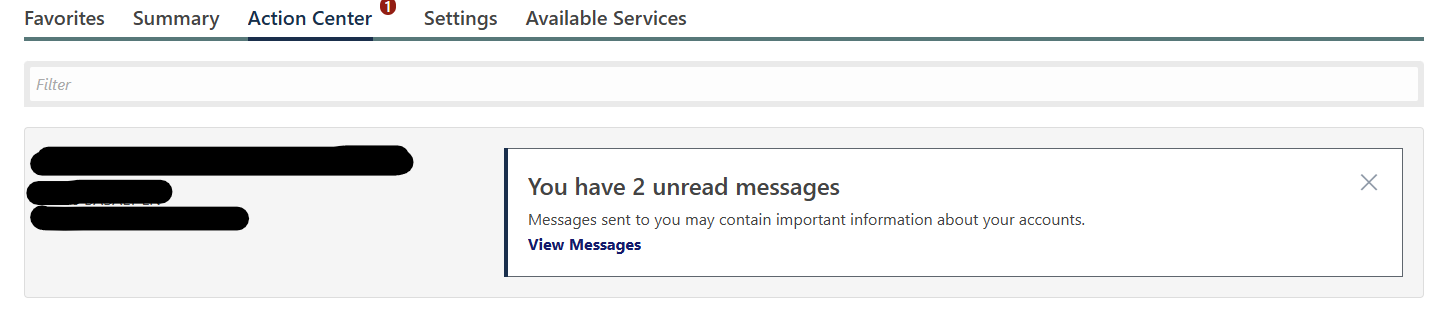
Click on "View Messages". Your messages should show up here.
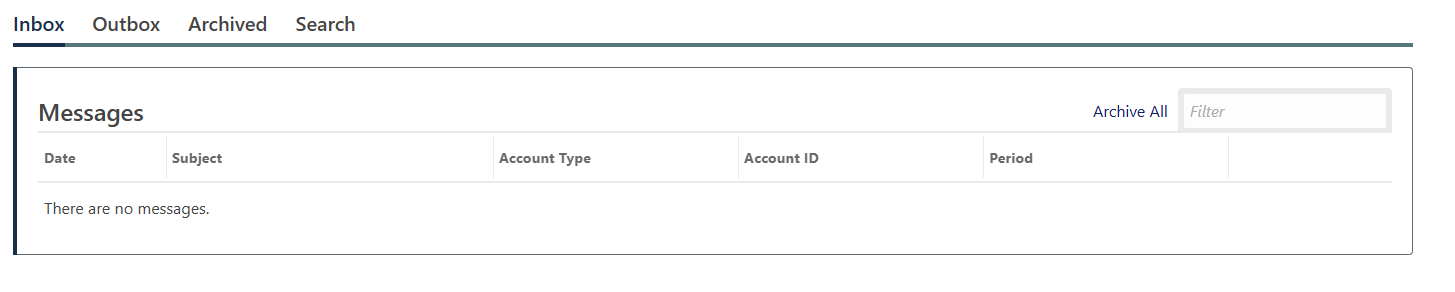
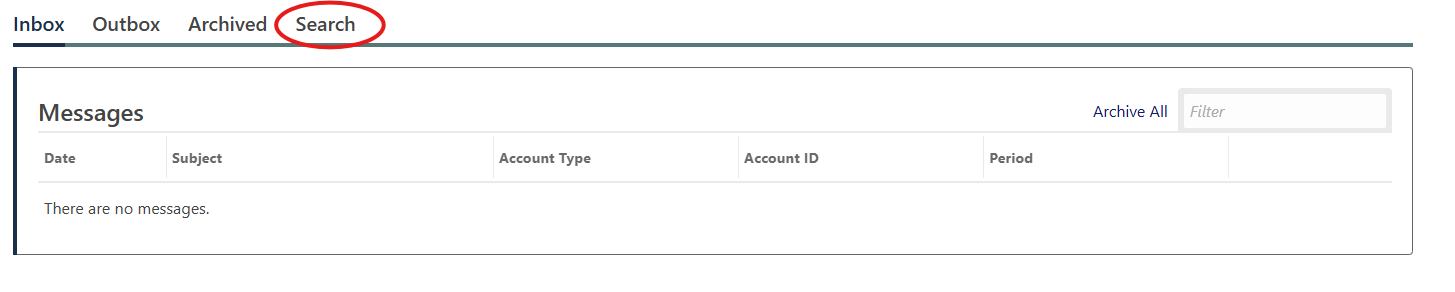
If your messages do NOT show up here, click on "Search" in the menu bar.
Use the "sent from" feature to select a date or date range.
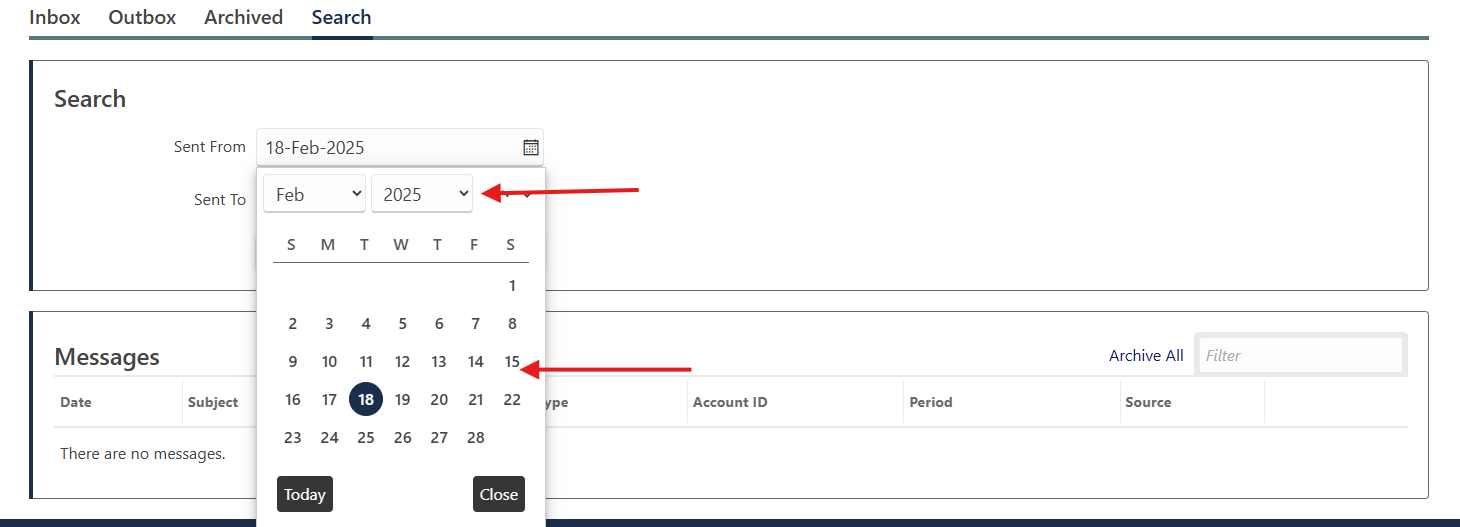
Pro Tip: Select a date at least one year ago or well before messages should've been sent.
Bulk Fleet Portal FAQs
- What is the myDMV Fleet portal account?
The Colorado DMV is excited to announce the launch of new bulk fleet account functionality on the myDMV portal. The goal is to streamline operations and reduce administrative burdens for Colorado fleet owners.
Owners can manage fleet transactions conveniently online through a centralized digital dashboard. From this single location, fleet owners can easily view registration statuses, download bulk proof of insurance records, and add and remove vehicles from their fleet.
- Who is eligible for a myDMV Fleet portal account?
Customers who have a previously fleet-registered vehicle with the Colorado DMV.
- What do I need to set up a bulk fleet portal account?
During the portal account registration process, a fleet owner will need to enter their fleet account number and zip code of address where the fleet is registered to verify the fleet with DMV’s records.
The fleet owner will also be required to verify their identity and permission to authorize changes to the bulk fleet by entering their driver's license number, permit number, or state ID number, and upload their letter of authorization.
- How do I set up Bulk Fleet Account?
- Navigate to mydmv.colorado.gov.
- Select "Sign up for myDMV Account" then select "Fleet Account Sign Up."
- Enter your fleet account number and zip code of Fleet registration address to verify your fleet with DMV’s records.
- Verify your identity and permission to authorize changes to the bulk fleet by entering your driver's license number, permit number, or state ID number, and upload your letter of authorization.
- Create your login, including an email, password, and security questions.
- Set up your mail delivery options (electronic notifications are now available.)
- Review and confirm your information and hit submit!
Note: Please allow a few business days for us to finalize your account. We will send you a confirmation email once your account is ready to go.
For support, you can email dor_vs.support@state.co.us, call the DMV Call Center at (303) 205-5600, or visit your county motor vehicle office. We look forward to helping you move your business forward.
Business Portal FAQs
- Who qualifies for a business account?
Any business owner with a Federal Employer Identification Number (FEIN) that requires a myDMV account to perform various activities such as registering new vehicles or viewing their records with the Department of Revenue.
- What do I need to set up a business account?
During the registration process, a business account owner will need to provide their business name, FEIN, email address, and copies of their businesses’ Articles of Organization and Employer Identification Number Letter.
- How do I set up a business account?
Business accounts may be set up through the new mydmv.colorado.gov web portal.