
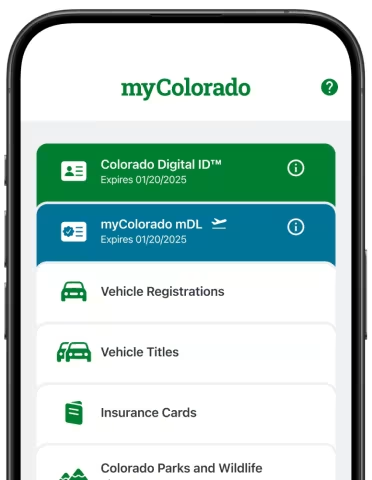
Colorado residents can now add their Colorado mobile driver license (DL) or identification card (ID) to the myColorado app. To learn more about the myColorado app, click here.
Adding your mDL in the myColorado app provides easy access to a privacy-first, state-issued digital credential that puts you in control of your identity. With myColorado mDL, TSA security checkpoints at Denver International Airport (DEN) and other airports nationwide are more convenient than ever. No guesswork. No sorting through your wallet. No visual inspection. Just instant confirmation of your digital identity straight from your phone!
Add your mDL before arriving at the airport to ensure a secure connection and full functionality prior to TSA screening. Before you go, check out the differences between the new myColorado mDL and your Colorado Digital ID.
| Feature | Mobile Driver License (mDL) | Colorado Digital ID (dDL) |
| Primary Use | Optimized for out-of-state travel and TSA airport security checkpoints. | An option for convenient, in-state proof of identity, age, or address where accepted. |
| Technical Standard | Built to meet rigorous international standards adopted by TSA for REAL ID compliance. | A custom, state-specific credential optimized specifically for local use. |
| Where to Use It | Denver International Airport (DEN) TSA checkpoints and countless other airports across the country. | Many local Colorado businesses, state agencies, and participating law enforcement agencies. |
| Platform Availability | Available in the myColorado app, Apple, Google, and Samsung Wallets. | Lives in the myColorado app separately as a digital image of your driver license or identification card. |
| Replaces Physical ID? | No. Residents should continue carrying their physical driver license or state-issued ID. | No. Residents should continue carrying their physical driver license or state-issued ID. |
Things to Know
- The myColorado mDL is separate from the Colorado Digital ID. Yes, there is a difference!
- Keep reading to learn when and where you can use each.
- The myColorado mDL can be used at TSA.
- Be sure to add your mDL in advance so it is available when needed.
- You can access your myColorado mDL within the app's Wallet.
- The myColorado Wallet is located in the bottom left corner of the app.
- You should still carry your physical ID card.
- State law requires you to carry your physical driver license when operating a motor vehicle - even when you have the mDL.
Get Started
Current myColorado users: Make sure you have the latest update for the myColorado app by visiting the App Store or Google Play Store on your device.
New users: Download myColorado from the App Store here (iPhone) or Google Play here (Android), open the app and make sure your Colorado Driver License or ID Card is ready. Note: The myColorado mDL requires iOS 17.0 or Android 13.0 or higher.
Once you have the latest version of the myColorado app, and have your physical card ready, you will:
- Tap "Add your myColorado mDL" in the Wallet.
- Review the details and tap "Add mDL".
- Follow the prompts on your screen to scan the front and back of your physical ID, then take a selfie to confirm your identity.
- Review your information, then tap "Continue" to share it with the Colorado DMV.
You’ll know your mDL is ready when the button in the Wallet reads myColorado mDL.
Note: approval from the DMV may take a short amount of time. If there are any problems or additional review needed to issue your mDL, additional instructions will be displayed in the app.
Sharing Your Information
- Open the myColorado app and tap on "myColorado mDL" in the Wallet.
- Tap "Present QR Code" and allow the reader device to scan the QR Code.
- Review the information being requested and select "Approve". (Note: if you select "Deny", you may be asked to scan again, or provide a different form of identification.)
Once the information is sent, you will see a Success message on your device, and your shared information will be available to the person scanning your mDL.
A myColorado mobile driver license (mDL) is a digital version of your physical driver license or state-issued ID card, stored securely on your smartphone within the myColorado app. Unlike a simple photo or scan, a myColorado mDL is a cryptographically secured, government-issued credential that meets international standards recognized by TSA for airport identity verification.
A myColorado mDL (Mobile Driver License) operates through a three-step trust loop between the state, your device, and the verifier:
- Issuance: The Issuing Authority (e.g., the DMV) authenticates your physical driver license and issues a cryptographically signed digital credential.
- Storage: The myColorado app encrypts and securely stores this credential directly in the myColorado app on your smartphone.
- Verification: When identity proof is needed, the app directly transmits the required data (often offline via Bluetooth or NFC) to the Verifier's mDL Reader, which instantly confirms its authenticity.
- Enhanced Privacy: You control what information is shared. Share only the information a verifier actually needs — for example, confirm you’re 21+ without revealing your home address or exact birthdate.
- Superior Security & Fraud Prevention: Cryptographically signed by the State of Colorado, so it cannot be forged or altered.
- Convenience & Touchless Verification: No physical card to forget, lose, or damage. Your ID is always with your phone. During transactions or airport checks, your phone never has to leave your hand.
- Remote Management: If your smartphone is lost or stolen, your mDL cannot simply be read off the device. Furthermore, you can instantly lock or revoke the mDL remotely.
- Real-time Updates: mDLs can update in real-time. If you change your address or renew your license, the information can refresh automatically without the need for a trip to the DMV.
- Federal Acceptance: mDLs are being approved for official federal uses, including expedited verification at participating TSA airport checkpoints.
myColorado mDLs are accepted at all Colorado airports, including Denver International Airport (DEN), for TSA security checkpoints. Statewide, over 400 local entities—including participating liquor stores, cannabis dispensaries, and select law enforcement agencies—accept them for age and identity verification using an mDL reader or app.
Note: You must still carry your physical driver license while driving. Law enforcement officers are not universally required to accept a digital ID during a traffic stop.
You will never need to hand your unlocked phone to anyone.
- At the airport: Tap your device against the NFC reader.
- At a business: If a business utilizes an mDL reader or app, present the secure QR code on your screen to be scanned.
In both scenarios, your phone will display exactly what information is being requested (e.g., just your age and photo). You then authorize the release of that specific data using your device’s security features, such as Face ID, a fingerprint, or a PIN.
While acceptance is expanding across the country, your Colorado mDL is not universally accepted outside of Colorado.
You can use your Colorado mDL at TSA airport security checkpoints in over 250 participating airports nationwide.
At this time, most Colorado law enforcement agencies do not accept mDLs. You are still required by law to carry and present your physical card during traffic stops. Failing to provide your physical ID upon request may result in a charge for "Refusal to Display a Driver License".
No, you generally do not need a physical REAL ID to be issued an mDL. However, to use your mDL for federal purposes—such as at TSA checkpoints—your mDL must be linked to a REAL ID-compliant physical card.
No, the myColorado mDL does not replace your physical DL/ID. It is designed strictly as a companion. You must continue to carry your physical card, as mDL acceptance is still limited across retail, law enforcement, and other government agencies.
No. The myColorado mDL is free of charge for Colorado DMV customers.
The verification process involves capturing a photo of the front and back of your physical card. If you don't have one, you can request a duplicate card through the DMV. Click here to request a duplicate card.
The Colorado Digital ID™ and the myColorado mDL are two distinct credentials designed for different situations:
- Colorado Digital ID™: Best for in-state use — proving your identity, age, or address to Colorado businesses, state agencies, and law enforcement agencies that accept it.
- myColorado mDL: Built to specific federal standards, making it accepted at TSA airport checkpoints and by verifiers requiring that standard. If you plan to use your phone at airport security, you’ll want to set up your mDL.
If you already have a myColorado mDL when you renew your license or ID, your mDL will be updated when the DMV processes your renewal, and you do not need to take any action.
If you do not have a Colorado mDL at the time of your renewal, you will not be able to receive an mDL until your new physical card arrives in the mail.
There is a strict limit of two mDLs per individual. Those two mDLs include:
- Digital Phone Wallets and Smartwatches: If you add it to your phone's digital wallet (like Apple, Google, or Samsung) and have a paired wearable watch, that counts as one.
- The myColorado app: If you want to hold an mDL inside the myColorado app, you must make sure you do not have it active on two different mobile phones or tablets. If you do, you must remove one from those devices to clear space for the myColorado app version.
You must remove one of your existing mDLs to proceed. To learn more about how to remove an existing mDL, click below to visit your specific digital wallet provider:
You cannot transfer your myColorado mDL to another device. You must remove your mDL from the myColorado app on your old device. On your new device, you will need to go through the process of adding your mDL to the myColorado app.
This process generally takes a relatively short period of time. If the DMV needs to gather more information, you will receive a notification with next steps. In these cases, it may take a little longer.
No. Your myColorado mDL is provisioned to a single device at a time for security reasons. If you need to present your mDL from a different device, you must go through the approval process on that device.
For security reasons, only one myColorado mDL can be present on a device. You cannot share a single device between multiple users and present an mDL.
If multiple users share a device to use myColorado, only the user who has an mDL issued to that device will see the options for the mDL in the myColorado app. Other users will not see the option to add an mDL unless the first user deletes their mDL.
If you no longer have the device containing your mDL enrollment, you must contact the DMV Call Center at (303) 205-5600 to have your myColorado mDL removed from the old device.