
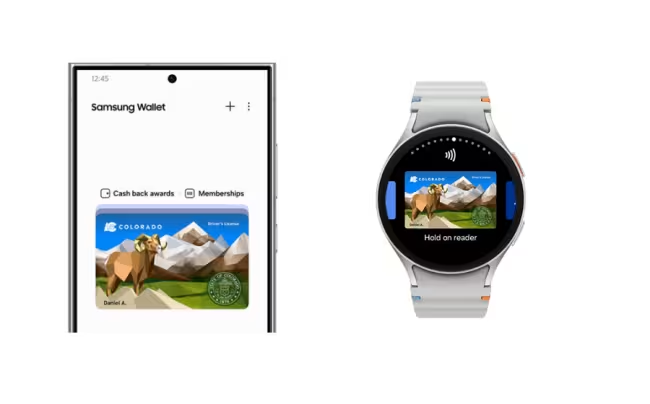
Your Colorado ID in Samsung Wallet.
Airport security just got easy.
Colorado Mobile ID is a voluntary, secure, digitized version of your state-issued driver license (DL) or identification card (ID) in Samsung Wallet. Colorado Mobile ID offers even more security than the physical, state ID, or driver license because Colorado residents can choose what personal information to share with others. Colorado Mobile ID is currently the only mobile phone-based identification that TSA recognizes. It is only available to individuals with a valid Colorado-issued driver license or ID card. You must have an eligible Colorado driver license or state-issued identification card.
Colorado also supports adding a Colorado driver license or ID to Galaxy Watch devices.
mDL request rejected?
Your ID in your phone
You can add your Colorado driver license or state ID to Samsung Wallet* and use it at participating TSA Precheck® checkpoints***. Instead of taking out your physical ID and passing it to a TSA Officer, you can open your Samsung Wallet and tap or scan to authenticate on a TSA digital identity reader. It’s quick, convenient, easy, and secure.
Please note: Colorado Mobile ID is only available to individuals with a valid Colorado-issued driver license or ID card.
It’s secure and private
With a fingerprint or PIN required for access and with Samsung Knox on your Galaxy phone, your Samsung Wallet is secure. The personal information from your driver license or state ID is encrypted.
1. Add
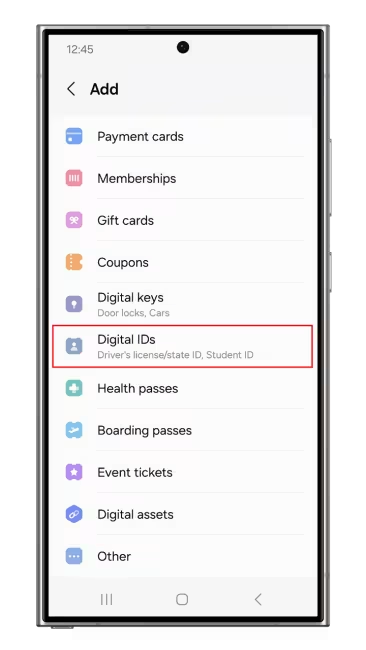
- Open the Samsung Wallet app to the ‘Quick access’ tab
- Click on ‘+’ button
- Select ‘Digital IDs’
- Click on the ‘Driver License/State ID’ icon.
2. Scan ID
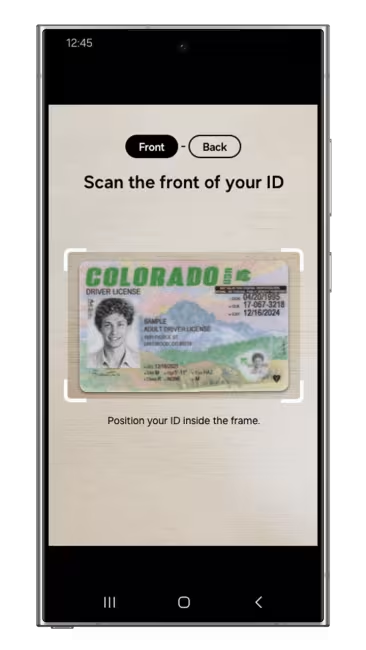
- Scan the front of your Driver license or state ID
- Scan the back of your Driver license or state ID
- Click ‘Next’.
3. Scan
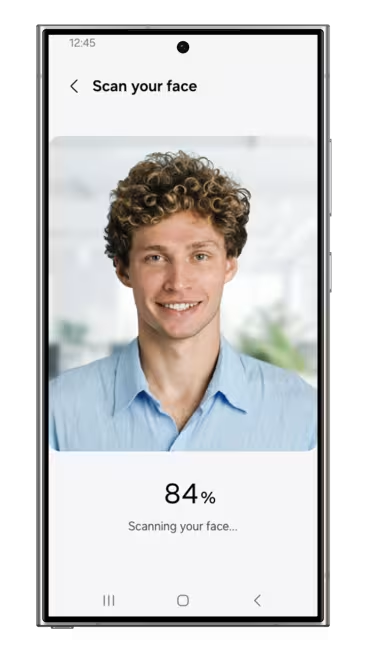
- Follow the on-screen instructions for your Face Scan. The Face Scan is a way to verify “you are you”, the rightful holder of the driver license or state ID, and is for verification purposes only.
4. Verify
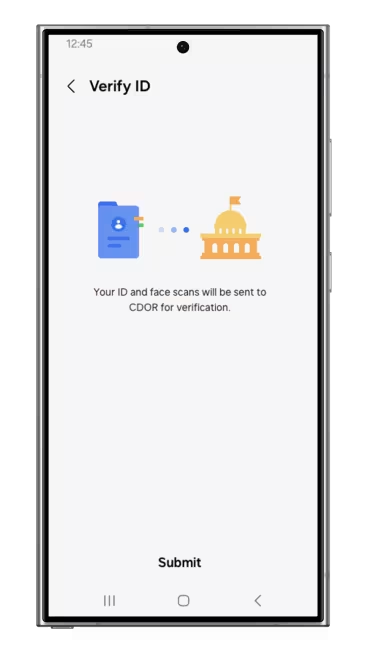
- Click ‘Submit’ and authenticate via fingerprint or PIN, which will then be associated with your mobile driver license to ensure that only you can access it.
Frequently Asked Questions (FAQs)
Colorado Mobile ID is a voluntary, secure, digitized version of your state-issued driver license (DL) or identification card (ID) available in Samsung Wallet. Colorado Mobile ID offers even more security than the physical, state ID, or driver license because Colorado residents can choose what personal information to share with others. Colorado Mobile ID is currently the ONLY form of mobile phone-based identification that is recognized by CDOR and it is only available to individuals who have a current, valid Colorado-issued Driver license or ID card. You must have an eligible Colorado Driver license or state-issued identification card.
- Have an eligible Colorado Driver license or state-issued identification card.
- To enroll and use Colorado Mobile ID in Samsung Wallet:
- You must have a valid and easily readable Colorado driver license or state-issued ID card.
- Have a Samsung Wallet / Mobile DL eligible device.
- Samsung Wallet installed on a Samsung device running Android 12 or above.
- An authentication method for your device (e.g., fingerprint or PIN).
- Have a Samsung account.
- Your device region must be set to the United States.
- Open the Samsung Wallet app.
- In the "Quick access" tab, click on the "+" button at the top right corner, click on 'Digital IDs', then select "Driver license/State ID" from the icon list. As an alternative, this can be done from the "Menu" tab by selecting the "Digital IDs" icon, clicking on the "+" button at the top right corner, then selecting "Driver license/State ID" and hit "Next".
- When prompted, scan the FRONT and BACK of your ID and hit "Next"
- Read and accept the terms and conditions to ensure you understand the Face Scan process and hit "Next" (this scan will not be stored on the device but will be used to match to your ID and verify your identity).
- Follow the on-screen instructions for your Face Scan. The Face Scan is a way to verify “you are you”, the rightful holder of the Driver License or State ID, and is for verification purposes only.
- Click "Submit" to complete the application. You will need to authenticate via fingerprint or PIN. The authentication method you choose - fingerprint or PIN - will be associated with your Colorado Mobile ID to ensure that only you can access and use it.
Once finished, you should receive a push notification informing you of the status of your Colorado Mobile ID request.
Colorado driver license or ID can be added to the following Galaxy devices:
Galaxy S Series - S20 or later
Galaxy Z Series - Z Flip 5G, Z Fold 5G, Z Flip 2, and Fold 2 or later
Galaxy A Series - A53, A54
Galaxy Watch Series: Watch 6 series or later with paired mobile devices having Android OS version U (Android 15) or above.
*Colorado Mobile driver license or ID is only available on devices running Android 12 or above.
Only certain Galaxy watches support Colorado Mobile ID. Please refer to "Which devices can I add my Colorado driver license or ID to?" for a complete list of eligible devices.
You need a paired Watch with Wallet-eligible Samsung Mobile device to add DL/ID to the Watch. You cannot add a DL/ID in a Watch without a paired phone.
Start adding DL/ID from Phone:
- Please refer to steps “How Do I add my Colorado driver license or ID to Samsung Wallet?” section.
- After face scan, you will be presented with Options to issue the ID into both Phone and Watch.
- Click "Submit" to complete the application. Once finished, the ID should become available in both Mobile and Watch with a push notification.
Start adding DL/ID from Watch:
- Open the Wearable App in Phone
- You can provision DL/ID in Watch only if the paired Samsung Phone already has DL/ID.
- Access “Add to Watch -> Digital IDs” section and select “Driver’s License/State ID” option
- You should see available ID to add to Watch. Click “Activate”
- You need to complete the steps in the Phone which includes Face Scan and submit the application.
- The ID should become available in the Watch when your application is approved.
When you unpair a Watch from the Phone, the Colorado driver license or ID in the Watch will be deleted. Once you pair the new Wallet-eligible watch with Wallet-eligible phone, you can add the ID to the Watch from your Wearable’s App. For more details, please refer “How do I add my Colorado divert license or ID to Samsung Wallet in Watch?”
The verification process involves capturing a photo of the front and back of your physical card. If you don’t have one, you can request a duplicate driver license or ID card through the DMV: https://dmv.colorado.gov/lostid
- Open Samsung Wallet App in Watch
- Click on your Mobile driver license or State ID. You will be prompted to verify your identity via PIN or other available mechanisms.
- Once verified, you should see your card details.
No, the ID in the myColorado App (which is the State of Colorado’s official mobile application) is not the same as the Colorado Mobile ID in Samsung Wallet. The Digital ID in myColorado app cannot be used at TSA PreCheck® security checkpoints. Still, it enables residents to have secure and easy access to state services and create an electronic version of their Colorado driver license or state-issued ID on their mobile device. This digital credential can be stored on a smartphone and presented as proof of identity within the state. More information about the myColorado app can be found here: Home (mycolorado.gov)
For most users, approval will happen the same day. However, additional verification may be needed for others. If more information needs to be gathered, you will receive a notification with the next steps.
In some cases, additional verification will be needed to participate in Colorado Mobile ID. In such cases, a verification letter will be sent to their address on file with the DMV. Once they receive the letter in the mail, they will be prompted to navigate to e-Services on the DMV website and enter the verification code provided in the letter, in addition to a few other data elements that are used to verify their identity. In other cases, customers may need to meet with an agent in person to move forward with enrollment. For more information, call (303) 205-5600 for support.
Try to submit the request again. Make sure the lighting is good and you follow the instructions until the end. If you continue to get rejected, please call (303) 205-5600 for support.
Colorado Mobile ID is voluntary and serves as a companion to your physical, plastic DL/ID—it is not a replacement for the physical card, and you must continue to carry your physical DL/ID with you. This is determined by the Transportation Security Administration (TSA). Please visit TSA.gov for the most up-to-date support for IDs in Samsung Wallet.
Possessing a Real ID is not required to add your Colorado driver license or State ID to your Samsung Wallet.
If you plan to use your Colorado-issued ID or license to fly within the U.S., ensure it is REAL ID-compliant. For more information on CO REAL ID, visit https://dmv.colorado.gov/real-id-and-colorado
At participating airport TSA PreCheck® checkpoints, you have two options to present your Colorado Mobile ID at a TSA digital identity reader:
Present your Colorado Mobile ID using NFC.
Tap your phone near the NFC reader. When you have done this successfully, your phone will display the information requested by the TSA digital identity reader. Authenticate via fingerprint or PIN to confirm and share the requested information with the TSA digital identity reader.
Present your Colorado Mobile ID via QR code.
Open the Samsung Wallet app. From the "Quick access" tab, scroll to and click on your Colorado Mobile ID. Authenticate to continue to the card details page, then select "view QR code" to generate a QR code. You can scan this QR code on the reader. When you have done this successfully, your phone will display the information requested by the TSA digital identity reader. Authenticate via fingerprint or PIN to confirm and share the requested information with the TSA digital identity reader.
Note: Currently, a Colorado Mobile ID can only be used at select TSA PreCheck® checkpoints in select airports in participating states. Please visit the TSA Digital ID site (https://www.tsa.gov/digital-id) for the most up-to-date information on TSA acceptance. Samsung recommends that you continue to carry your physical driver license or State ID as a form of identification. Some TSA PreCheck® checkpoints may require you to present additional identifying information (i.e., certain TSA PreCheck® checkpoints may also capture your image to compare it to the one on your Colorado Mobile ID).
Law enforcement currently does not accept Colorado Mobile IDs; please continue to carry your physical license with you at all times. Please check this FAQ later for updated information.
Colorado Mobile ID verifies your identity by comparing images and validating data on file with CDOR. This verification must be complete before a Colorado Mobile ID may be approved. Once approved, all data is stored securely on your device, protected by hardware and software security, and inaccessible to anyone but you. Only when you unlock your device can your information be presented, so if your phone is lost or stolen, no one can use your Colorado Mobile ID without your authentication.
Colorado Mobile ID on Samsung Wallet is implemented using international standards and can be presented to any compatible reader to verify an individual's identity. As this is a new technology, Colorado Mobile ID should be treated as a companion to your physical, plastic DL/ID—it is not a replacement for the physical card, and you must continue to carry your physical DL/ID with you.
The Samsung Wallet app that holds Colorado Mobile ID is free to use on all Samsung devices. CDOR is not currently charging any additional fee to use Colorado Mobile ID.
Colorado Mobile ID in Samsung Wallet doesn't collect, track, or store who you present your ID to. An encrypted version of your DL/ID information is securely stored on the mobile device when approved for Colorado Mobile ID.
For additional questions about Colorado Mobile ID on Samsung Wallet, please call (303) 205-5600 for support. If you're having issues with the Samsung Wallet app or your Mobile device, please contact Samsung Customer support (https://www.samsung.com/ca/support/contact).
You can remove your Colorado Mobile ID both from within the Samsung Wallet app and remotely:
- Open the Samsung Wallet App.
- From the "Quick access" tab, scroll to and click on your Colorado Mobile ID. You will be prompted to verify your identity either via fingerprint or PIN.
- Click the 3 dots on the top right of the ID card details screen to open the overflow menu.
- Click on the "Delete" option.
How to remove your Colorado Mobile ID remotely:
- Log into the SmartThings Find site (https://smartthingsfind.samsung.com/login) with your Samsung account information.
- Select your Mobile device.
- Click either "Erase data" or "Lock" to reset or temporarily lock your device, which will in turn, disable your mobile driver license or State ID.
If you previously removed your Colorado Mobile ID from your device but would like it back, open Samsung Wallet app and begin a new Colorado Mobile ID request.
Colorado Mobile ID cannot be transferred to another device. If you get a new Samsung Wallet-eligible phone and attempt to add your Colorado Mobile ID to Samsung Wallet on the new device with the same Samsung Account, you will be asked whether you want to delete your Colorado Mobile ID from your old phone. By clicking "Yes", your Colorado Mobile ID will be deleted from your old device, and you will then be able to add it to your new one.
If you are using a new Samsung Account on your new phone, you will be asked to delete your Colorado Mobile ID from your old phone manually. Please see the response to "How do I remove my Colorado Mobile ID from Samsung Wallet?" for instructions on Colorado Mobile ID removal.
You can remove your Colorado Mobile ID both remotely:
- Log into the SmartThings Find site (https://smartthingsfind.samsung.com/login) with your Samsung account information.
- Select your Mobile device.
- Click either "Erase data" or "Lock" to reset or temporarily lock your device, which will, in turn, disable your Colorado Mobile ID.
Colorado Mobile ID serves as a companion to your physical plastic driver license/ Identification Card and is entirely voluntary. If you are not interested in Colorado Mobile ID, there is nothing you need to do.
Yes, you should always carry the mobile copy of the boarding pass in Samsung Wallet, or a physical copy of the boarding pass. Colorado Mobile ID is voluntary and serves as a companion to your physical, plastic DL/ID - it is not a replacement of the physical card and you must continue to carry your physical DL/ID with you.
<< Back to Colorado ID on your phone home.
* Requires a Samsung Wallet eligible device with the embedded secure element (eSE), Samsung Wallet version 5.2.99 or higher, and Android S or later OS. Please visit the mobile driver license section of the Samsung Wallet FAQ for full compatibility details.
**Currently only available in select states. A mobile driver license is optional and acts as a companion to your physical ID; it does not replace it.
***Only available at select TSA PreCheck® checkpoints at participating airports. Requires a compatible TSA digital identity reader. Availability subject to TSA and participating airport discretion. A boarding pass may still be required for ID verification at the TSA checkpoint. For a complete list of participating airports and additional information, please visit www.tsa.gov/digital-id.
Download the New IACA Root Certificate Here (Updated: July 2026)