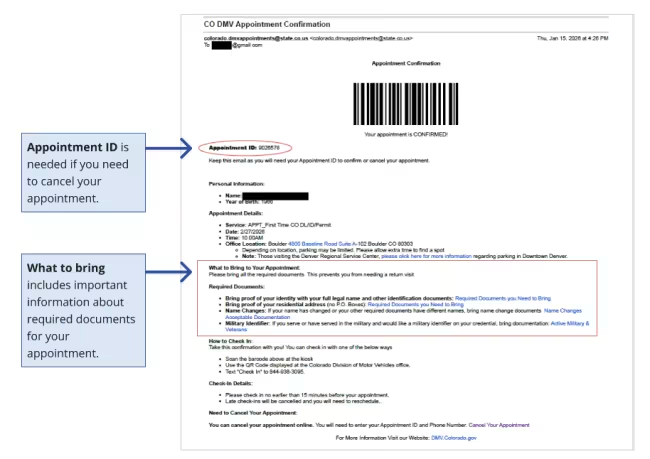
Follow these steps to use the Appointment Booking Tool. Appointments can be made for Driver/ID services and some vehicle services (Westgate only). When you’ve made it, you’ll get the confirmation email you need to bring to your appointment.
You cannot book appointments with your county or third party driver education companies on this site.
- For most vehicle services, contact your county office, or view all vehicle services to learn more.
- Driver education, drive skills tests, and motorcycle skills tests are provided by third parties. Book directly with a school or testing location, or find an approved provider.
-
Select Your Location
Choose any state DMV location for license services. For registration-related tasks, you will generally need to visit a county office.
-
Select Your Service
Our appointment tool groups services into categories. Please select the category based on the service in the table below. If you cannot find your specific service, select "Renew Colorado DL/Permit/ID" and confirm the details with staff when you arrive.
If you want to... Select this service New driver / license Get a first time Colorado license or ID First Time CO DL/Permit/ID/CDL Transfer license, permit, or ID from out of state First Time CO DL/Permit/ID/CDL Upgrade a permit to a driver license Renew Colorado DL/Permit/ID
or upgrade onlineTake regular driver written permit test Written Tests
or take the test onlineRenewals or changes to an existing license Change a name Renew Colorado DL/Permit/ID Downgrade a driver license to an ID Renew Colorado DL/Permit/ID
or downgrade onlineChange an address Renew Colorado DL/Permit/ID
or change address onlineRenew a Colorado license or ID Renew Colorado DL/Permit/ID
or renew online if eligibleReplace a lost, stolen, or damaged driver license, ID, or permit Renew Colorado DL/Permit/ID
or renew onlineAny other driver/ID service not listed Renew Colorado DL/Permit/ID Records and tickets Get driver records Renew Colorado DL/Permit/ID
or get records onlinePay a ticket (Westgate only) Westgate Driver Records or pay online Submit reinstatement documents (Westgate only) Westgate Driver Records or submit online Motorcycle Add a motorcycle endorsement Renew Colorado DL/Permit/ID Take written test for motorcycle permit Written Tests Commercial driver Take commercial driver license written permit tests, including endorsements* CDL Written Tests Upgrade a CLP (Commercial Learner’s Permit) to a CDL First Time CO DL/Permit/ID/CDL Downgrade a CDL to a regular driver license Renew Colorado DL/Permit/ID Register with IRP (Westgate only) Commercial vehicle IRP Dealer Process titles (Westgate only) 3 Dealer Titles Processed Non-County Vehicle title and registration (State Services) Title and registration services (Westgate only) Other Non-County Title & Reg. Services *Due to new federal regulations issued by the Federal Motor Carrier Safety Administration (FMCSA), effective Monday, September 29, 2025, the Colorado DMV has paused the issuance and renewals of term-limited (non-domiciled) Commercial Driver’s Licenses (CDLs) and Commercial Learner’s Permits (CLPs) until further notice.
The DMV does not conduct driving and motorcycle tests. These are administered by private schools. Check our list of approved schools and contact them to learn more.
-
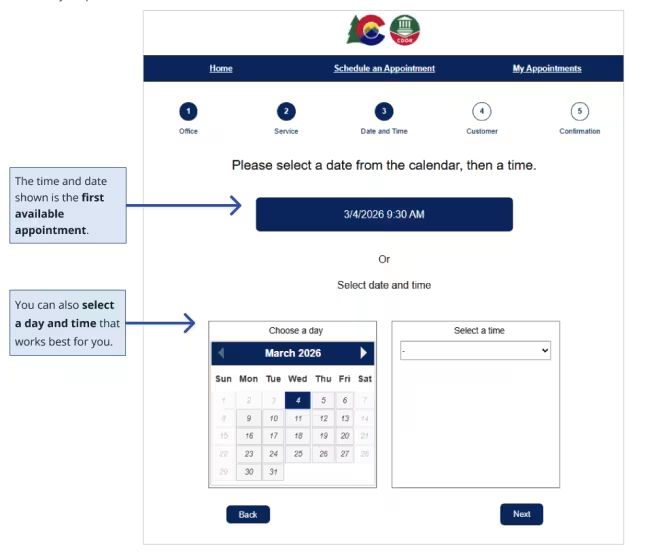
Save a Date and Time
- First available date is automatically highlighted
- Browse other dates using the calendar
- Select your preferred time slot
-
Enter Your Information
Make sure you provide a valid email address and phone number, and we’ll send your confirmation to you by email.
-
Verify Your Information
Choose whether to receive a verification code by email or text message. Then enter the code to verify your contact information.
-
Save Your Appointment Confirmation
Save your confirmation. You’ll need to show it on your phone or on paper when you come to your appointment. The confirmation page also includes important links and information about your appointment. And if you need to cancel your appointment, you will need both your appointment ID number and the phone number you provided.